Vincent Cheung

Vincent Cheung's Blog


Home Older Posts »

Friday, February 27, 2009

Shape Collage 2.1

Shape Collage 2.1 has been released!

There are a couple new features, some performance tweaks, and some bug fixes. The coolest new feature is the ability to add photos from the web. Just give it *any* webpage that has pictures on it and Shape Collage will automagically download the pictures from that webpage for use in the collage! This does not however, work for sites that require you to login, like Facebook, but that's what FaceDown is for.

Other new features include the ability to adjust the rotations of the photos and the drop shadow. The program settings are now saved between sessions so if you like the settings a certain way, you don't have to set them every time.

I promise that this blog is not becoming an advertisement for Shape Collage and VincentCheung.ca. I will be blogging about my vacation (eventually) :p

Thursday, February 26, 2009

Shape Collage Around The World

Think of a language.... got it? Well, it's probably in the list below.

Shape Collage has been written about in at least 22 languages! Here's a small sampling of sites from around the world talking about Shape Collage. I arbitrarily chose sites that either had nice collages or gave me a lot of traffic and they are ordered under each language approximately as to when the page appeared, with the oldest first.

English
Spanish
Portuguese
Italian
Chinese
Japanese
Korean
French
German
Russian
Polish
Romanian
Hungarian
Turkish
Dutch
Finnish
Malay
Serbian
Swedish
Arabic
Icelandic
Latvian

Thursday, December 04, 2008

Shape Collage


Some collages of Tiki made using Shape Collage


Shape Collage is the latest side project that I've been working on. It is an automatic photo collage making program that can make collages in different shapes. Just look at the collages above and at the end of the post to see what it can do. There are a lot more examples on the Shape Collage web page.

It's really easy to make a collage. You can make one with just 2 mouse clicks and in as little as a couple seconds! It's quite customizable as well, as you can change the shape to really, anything you want. You can even draw your own shape! You can also customize the border, background, etc.

Arranging photos into a collage


The photos are automatically placed in the desired shape of the collage using a machine learning algorithm that I came up with that is simple, but fast and effective. Basically what it does is put the photos on a page and jiggle them around so they are arranged nicely. This is a much harder problem than you may think. My readers with some knowledge of computer science will be familiar with NP problems. My algorithm isn't perfect, but it does a pretty good job most of the time. If you're really anal about it, you can save the collage as a Photoshop PSD and edit the collage in Photoshop if you don't like the automatic placement of the photos.

I started working on this project b/c I read a paper that automatically created a photo collage and thought that it was really cool, especially since it took me so long to make my Californian photo collage. Since they didn't actually release a program or their source code, I decided to just implement their approach, but it was overly complicated and rather slow - it took several minutes to create a collage with just 30 photos. So, I tried something simpler that was much faster - my program can easily create a collage with thousands of photos. Then I realized that my algorithm didn't have to only create rectangular collages and could also create collages in different shapes, something that I had never seen before, and so Shape Collage was created!

Anyways, check it out and let me know what you think! It's available for Windows, Mac OS X, Linux, and anything that supports Java.

Snowboarding snowman collage


Volleyball collage

Saturday, October 11, 2008

Google Chrome


I've converted to Google Chrome. If you didn't know, Google Chrome is Google's fairly newly released web browser. I was previously using Firefox, but I like Chrome for a few reasons. The most important is memory management. Without getting into too much technological detail, it basically spawns a new process for each tab instead of just a new thread, this makes it easier to free memory when you close a tab. I tend to keep a lot of tabs open (I currently have 34 open), which are mostly pages that I opened and will go back to soon (too lazy to bookmark and then delete the bookmark later) or some like Gmail, Google Reader, and Google Calendar that I always keep open. While Firefox 3 has improved on memory management a lot, it still gets really bloated and I would have to close the whole browser and reload it every day or two. Chrome does a much better job and I like that it has it's own task manager (shift-esc) that shows how much memory and cpu usage each tab is using.

Another is cpu usage. I noticed that Firefox would sometimes use up a lot of cpu usage even when I wasn't doing anything (it was just sitting in the background). It happened on just some sites and I think most of the time it was related to flash ads. Chrome doesn't have this issue, or at least I can easily find out which tab is causing the problem and kill it. Also, if flash is having an issue, which it sometimes does, again, I can just kill the flash plug-in and reload the pages that I need flash, all without reloading the whole browser. With each tab in a separate process, one website won't cause the whole browser to crash, it'll just crash the one tab. I find Chrome to be a bit snappier than Firefox as well, especially when first starting the browser. I found the combined location bar and search box confusing at first, but now that I'm used to it, I really like it. I really like that I can customize the search, so for example, if I want to search google, I just type in the keywords, if I want to search google maps, I just precede the keywords with "map" (I added that one). I can also search mininova and isohunt (for bittorrents) by just typing in "mininova heroes" or something like that and it'll send me right to the search results from mininova. It saves me from first going to the site and then searching.

It's not all positive for Chrome though. It doesn't have extensions (though I don't use any that I can't live without) and it doesn't support the google toolbar (which I like for the keyword highlighting and autofill). The bookmarking in Chrome sucks, fortunately I don't bookmark much, but I'd like to be able to periodically bookmark all the opened tabs just to make sure that I don't lose them. Chrome also crashes on me every day or two (though I'm a pretty heavy user). It's not that big of a deal b/c it remembers all my tabs and reopens so fast, but still, it's annoying. It's pretty awesome though considering that this is it's first release. Way more stable than the first release of any other browser.

One other interesting feature that at first I thought was dumb, but turned out to be pretty cool is the page you get when you open a new tab. It shows you your most visited sites (screenshot above). This makes it really quick to open a new tab and go to one of these pages. It's kinda amusing to see what are my most visited sites:
  1. Statcounter - checking how many people visited my sites (blog, school, vincentcheung.ca, etc)

  2. Adsense - checking how much money I've gotten from ads on vincentcheung.ca ($57 since January, most of which is from the last few months)

  3. Slashdot - News for Nerds. Stuff that matters.

  4. The Star - Toronto's newspaper (get local, national, and global news all in one place)

  5. Facebook - No explanation needed

  6. Real Clear Politics - Checking the latest American election polls

  7. Digg - Procrastination

  8. Google News - More news (I also have a special "Volleyball" news section that has news articles with the word "volleyball" in them)

  9. TD - Watching my mutual funds portfolio drop in value

Thursday, September 11, 2008

GPS + Photos = Awesome

I got my GPS logger today and I took it out on the water with me when I went kayaking on Lake Ontario.

Basically the GPS logger is a small GPS device with no screen and you can connect it to your phone through bluetooth to figure out where you are. That's the basic "GPS" part. The "logger" part records where you've been and you can then download the tracks onto your computer later and do some cool stuff with it.

I got the QStarz BT-Q100Platinum. It works like a charm, is small, and the battery apparently lasts up to 32 hours. I'm not able to get a signal in my apartment, but once I got onto the street, it worked pretty well, although it made some errors with the tall buildings in the way, but out on the water, it was pretty accurate.

My attempt at hand modeling. If it looks bad, it's b/c the photo is not rotated correctly and I'm too lazy to fix this after having already uploaded the photo


Here's the path that I recorded (I rollerbladed to the place, kayaked to Centre Island and back, then rollerbladed home). The path isn't 100% accurate and some of the tracking is off. My rollerblading is not as erratic as the GPS device made it out to be (I was going straight on the road, but it thought that I had veered off the road a couple times and it also thought I was somewhere west of my apartment when I was in the elevator). It seems to be pretty accurate on the open water, but got confused in the city with the tall buildings blocking the satellites.


View Larger Map


That's pretty cool. It gets even cooler when you synchronize your photos to the path to get the exact longitude and latitude where you took each photo (since GPS inherently has timestamps for each data point). Click on the camera to see the photos that I took in that spot. This is all automatic!


View Larger Map


The long/lat info is stored right in the image file and when you upload to Picasa Web Albums, all the location information is automatically shown there as well (check out the map view on the right hand side).


I am definitely going to be doing this on my trips from now on!

Saturday, August 09, 2008

How to record the Olympic games from CBC

This tutorial will show you how to record the Olympic games from an internet streaming source using VLC. Since I am in Canada, I'm recording from CBC Olympics, which streams the videos in Windows Media format, but this procedure should work for other non-flash, non-silverlight, streaming videos as well (i.e. not YouTube or NBC Olympics).

1. Load the video that you want, eg. from CBC Olympics

2. Right-click the video

3. Select "Properties" from the right-click menu


4. Copy the URL of the streaming video


Edit (Aug. 14): The CBC is smarter than I give them credit. You can't just get the URL as described above. What you have to do is look at the URL of the page, something like:
http://www.cbc.ca/olympics/livevideo/#n=cbcsports_ca_4&p=athletics&e=mens_100m_round_1&dt=2008/08/14_08:49%20PM&s=http://authmfile.akamai.com.edgesuite.net/akamai.stream.auth/35018/wm/cbcwm.gen/v001/reflector:13377.js

Then, load that in your web browser (Internet Explorer doesn't load this page for me, but Firefox does), and there is a single line, something like:
var streamPath = "http://authmfile.akamai.com.edgesuite.net/akamai.stream.auth/35018/wm/cbcwm.gen/token_MTIxODc2ODQwMw==_febc7bc84345875bacae79a34caf97c4//reflector:19191.asx";

The URL in between the quotation marks is the actual URL to the streaming video.


5. Open VLC and open a network stream


6. Select HTTP source

7. Paste in the URL

8. Select "Stream/Save" in the "Advanced Options"

9. Click "Settings..."


10. Select "Play locally" and "File"

11. Specify the save file, eg. "Women's Volleyball - USA vs Japan.wmv"

12. Select "ASF" under "Encapsulation Method" (because the video is in Windows Media format)


13. Click "OK" twice to close the windows for steps 6-9 and 10-12, then watch as it also records (you can also close the browser window from step 1)


14. When you want to stop recording, click stop or close VLC, then rename the save file to .wmv (VLC adds an extra '}' to the end of the filename by accident)


Friday, February 08, 2008

How non-Americans can influence the elections

As a bit of a political news junkie, it frustrated me a little bit that no matter how inspired and moved I am by a candidate, my vote doesn't count.

I have, however, found a way that the world can influence American politics: (illegal) donations.

I'm not saying that I, as a non-American, went to Obama's donation page and made an individual contribution, which required me to lie about being "a United States citizen or a lawfully-admitted permanent resident". I'm just saying that people can do that...

Money counts. Obama and Clinton raised over $100 million each in 2007 and there were reports of Obama getting over $30 million in January and $7 million since Super Tuesday (2 days ago). With Obama's coffers, he was able to run TV ads in most of the Super Tuesday states, while Clinton was only able to do so in about half of them. Obama was even able to run ads during Superbowl, which usually costs a stupid amount. The money is used for all aspects of the campaign from hiring people, getting the word out, traveling costs, nomination fees, etc.

Obama has a big grassroots (netroots?) campaign and apparently a lot of his hundreds of thousands of donations are small contributions made online and by individuals, compared to other candidates that get most of their money from big donations from large corporations.

If I was "a United States citizen or a lawfully-admitted permanent resident", I would totally make a legal donation to Obama's campaign, but as it stands, I can't :). If you want to watch a good video of Obama, this is the one that really impressed and inspired me. It's a video of him giving a talk and Q&A at Google:

Sunday, February 25, 2007

Racist volleyball


I tried out for nine-man volleyball today. I am now a member of the Toronto Warriors! Oddly enough that matches my snowboard :)

So 9-man is like a complete bastardization of the sport of volleyball. The court is slightly bigger, the net is slightly lower, there are no rotations, and there are 9 people on the court! 5 hitters, 1 setter, and 3 passers. It's not uncommon to see 4-man blocks! You can do all these weird things too, like throwing the ball (looks like you're dunking it), and lifting/scooping the ball. It just feels so wrong doing those things. The weirdest rule is that if you hit the ball into the net, it doesn't count as a hit, and even weirder is that you can purposely throw the ball into the net, and then set it or something. It's bizarre. The game is also played on concrete rather than in a gym. That is not pleasant on the knees when jumping, or skin if you hit the ground...

The whole 9-man thing gets even more bizarre. The big tournament we play in, the North American Chinese Invitational Volleyball Tournament (the official website is down and there was no Wikipedia entry, so I made my own!) has built-in racism. 2/3 of the players on the court have to be 100% Chinese, and the rest have to be of Asian descent. For those of you slow in math, that's 6 Chinese dudes, and 3 other Asians on the court. That bodes well for me, as I should get more play time because of that :). The girl's team plays regular 6's (not sure if any of the rules are different), but the same racist rule applies.

I wanted to try 9-man b/c frankly, I've tried all the other variations of volleyball (men's, co-ed, reverse 6's, beach in various #s). I also know a bunch of people that play 9-man and they're all really good, so it's good ball. Lastly, it would mean that I would get coached again after a 8 year hiatus.

If you want to see 9-man in action, here's a video of a game between two really good teams. The video is great b/c it cuts out all the crap and it's just serve and play, and then serve and play, no time-outs, no arguing calls, no fetching balls, etc. The funny thing is that I've played with and against a couple of players in this video (Jon So, JP, Jeff Chung). My team is not nearly as good as these teams. Everyone on the team can play, but we don't have any superstars that will just murder the ball or hit over the blocks. It's understandable as the club was just formed this year and the team was built from scratch. The good thing is that since it's new and most people haven't played 9-man before, there won't be a big hazing thing (if any), since almost everyone's a rookie :)

The other interesting story of the day was just trying to get to the try-out...

Subway detour map: Bay is closed and you have to walk across the platform to change trains at Museum


I needed to get to Bloor and Yonge to meet up with Donny to get picked-up by James that who was gonna drive us b/c the gym was bloody far: Scarborough. I figured that I'd take the subway East bound for 3 stops to get from Spadina to Bloor-Yonge, but then at the St. George station, I'm told that the subway is messed and the East bound train is going to start heading South bound... I was like screw this, and I got out at St. George, and just ran the 2 subway stations to Yonge. I later found out that I could've got off at Museum and then crossed the platform to go back "North", which would've taken me "East". It's messed up. Today was the first day of all this crap. It's b/c they've shut down the Bay station to do construction of the tunnel.

The history of the subway is pretty cool. The two main lines used to be intertwined, which is why in some of the stations there are signs that can flip and that say "Finch", "Kipling", "Union", "Downsview", and "Kennedy" so you could figure out which train was which. There also used to be a "Lower" and "Upper" Bay station where the trains would cross between the lines. It was weird and it only lasted 6 months :p. Since then, they closed off the Lower Bay station and now it's used mostly in movies and commercials. Some people snuck into the station a few years ago and took pictures. Since the construction is on the tunnel around Bay station, the trains are being routed through Lower Bay, so you can actually see the secret station now! The subway doesn't stop, but it goes through it. I need to go check it out! Anyone wanna come?

Wednesday, February 14, 2007

Automagically download tv shows to your computer

I knew back in 2000 when I was downloading episodes of Dark Angel off the now defunct website, http://www.unowho.acmecargo.com/, dedicated to hosting downloadable episodes of the series, that the future of TV was downloading TV shows onto your computer, in better quality than cable and without commercials, that you could then watch whenever and wherever (with a laptop) you wanted and you could share them with your friends (on CDs back then) without loss of quality.

Some shows you really need to watch all of them to understand everything and if you miss one, you're screwed. That's why downloading episodes is so nice. If you want to start watching a series half way through a season, you can easily download all the earlier episodes and catch up and then join in the conversations at the water cooler, or Facebook wall, or whatever kids do nowadays. It's good for the show b/c it increases viewership. I got several people hooked onto Dark Angel by distributing CDs way back when and b/c of this pseudo-legal activity, more people were watching it on TV and watching the commercials. I started watching a lot of shows this way - 24, Buffy, Angel, Battlestar Galactica, Desperate Housewives, How I Met Your Mother, Heroes, and Grey's Anatomy. DVDs of TV shows are good and all, but they only started coming out after people started downloading TV shows. Plus, the DVDs don't come out until after the season ends, which does you no good when you miss an episode or want to catch up mid-season. Plus, I think they are unreasonably priced.

Back in 2000, the servers were centralized and slow, very few connections were allowed, you had to make sure that you didn't get yourself banned from the servers (you were so screwed if you did). All and all, it was a laborious process. Now, with the advent of bittorrent, everything is much easier, plus, downloading TV shows has gained in popularity and pretty much every show is posted online, often times by multiple ripping groups.

The problem now is that I download all my TV shows. I just don't watch TV on TV anymore! This means that for the 10 TV shows I watch, I have to download all 10 each week, and I have to remember which day that the show airs, if there's a new episode this week, and figure out when the episode makes it's way online. It's a hassle.

Introducing... BitTorrent RSS feeds for TV shows!!!!

What?

Ya.

What this means is that TV shows that I want are automatically downloaded to my computer as new episodes air. I don't have to touch a thing! It's like Tivo for your computer, but free, without commercials, you can burn them to DVD, and share them with friends (alternatively, you can force your friends/family/significant other to watch shows you like). I no longer have to know what day shows are on or whether there's a new episode this week, and I don't have to go and manually click and download 10 shows a week. I just come home late in the evening or wake up the next morning and I have TV shows to watch! Amazing!

There's a bit of a set-up, but it's worth it, b/c you only have to do it once. Set it and forget it!!! Here's how you do it.


Step 1: Get the right software
You need a BitTorrent client that supports RSS feeds, this is what I use:
  1. Azureus (multi-platform BitTorrent client)

  2. RSS Feed Scanner (RSS feed plug-in for Azureus)

I don't know the settings for any other BitTorrent client and I'll only show the settings for my set-up. Figure it out yourself if you use something else. Apparently µTorrent has an RSS feed built-in and they have a tutorial. I haven't tried it though.


Step 2: Get the feed
Get the BitTorrent feed for a TV show. I use tvRSS.
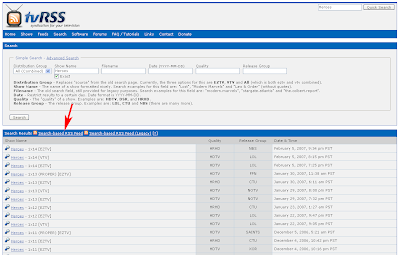


Step 3: Add the feed to the BitTorrent client
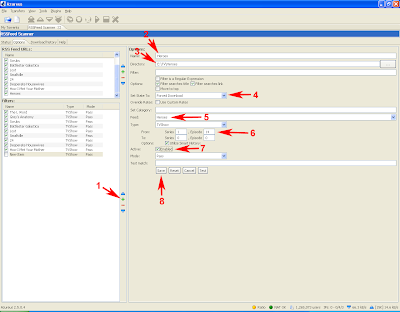
Go to the RSSFeed Scanner tab in Azureus (#0). You may need to go to "Plugins" then "RSSFeed Scanner" in the menu to get to this tab. Go to the "Options" tab, add a new feed (the +), then fill in the appropriate values. Paste the link from the previous step as the URL in #3. #5 is needed for mininova links to work (just do it).
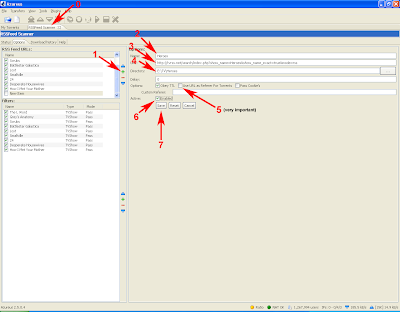


Step 4: Add the filter
This step may differ, or may not be needed, for other BitTorrent client set-ups, but it's necessary for the set-up listed above. The filter tells the feed reader what episodes to download and where to put them on your computer. Note in #6, you tell it which episode to start downloading at. You can leave it at the default to just download all the episodes from the beginning.


That's it!

To confirm that it's working, your screens should look like this:
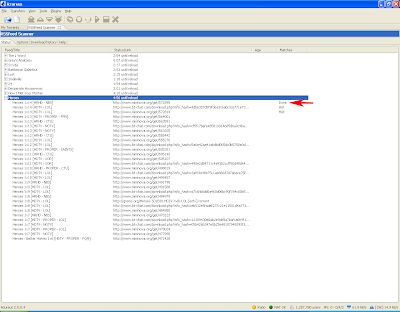
The "Status" tab will show which torrents have been downloaded
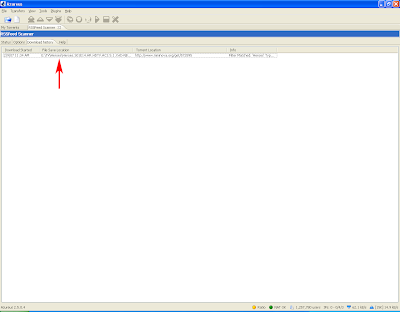


The "Download history" tab also shows torrents that you have downloaded through the feed
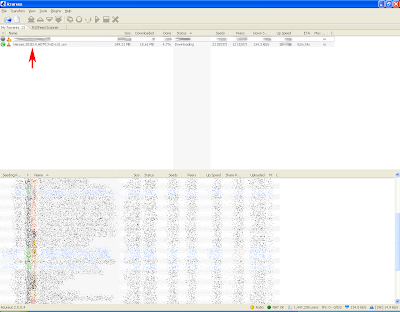


Downloads are automagically queued up for you as long as Azureus is running!


Disclaimer: Do not illegally download stuff. Don't steal. Don't do drugs. Don't smoke. Don't kill. I am not responsible for your actions. I did not actually download the file shown in the images. The images are faked.

Thursday, September 28, 2006

Hard evidence of my Internet problem

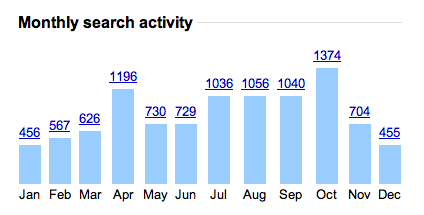
The two highest hours are 2 am and 3 am :s
I'm also not up before 10 and even then, just barely :p


So, I go into my Google Personalized Search, which basically keeps track of all your searches when you are logged into Google. I am always logged into Google now b/c of Gmail, Google Calendar, Google Reader, and Blogger, all of which automatically log you into Google. You can tell if you are logged in if your Gmail address is in the top right when you are on Google.com.

I check out the "Trends" in the search history, and see some shocking things...

Take a look at the image at the top of this post. It graphs the number of searches I did on Google during each hour of the day over the past year. I do more searches at 2 am and 3 am than at any other time!!! That is ridiculous. I'm also not very active before 10 am, and even then, not very much.

Ok, a few caveats about this data though. One, I'm not sure if time zones are taken into consideration b/c I did spend like 7 months in the West coast (3 hours behind) time zone (Seattle and California) and like a month in Central (1 hour behind) time zone (Winnipeg) in the past year. Plus, it's searches, so I could be up at 10, I just don't do any Google searches b/c I know where I'm going (e-mail, reader, slashdot, news, weather, chat, etc.)

I Google a lot


On average over this past year, I did almost 30 searches a day!

Notice the dip on Saturday!


This graph is encouraging. It says that I have a life on Saturday!!! AND Friday nights!!! Apparently I have a social life :). I probably shouldn't celebrate too much since I only do like 5 fewer searches on an average Saturday than the other days of the week.

Top searches, top sites that appear in the search result, and top clicks


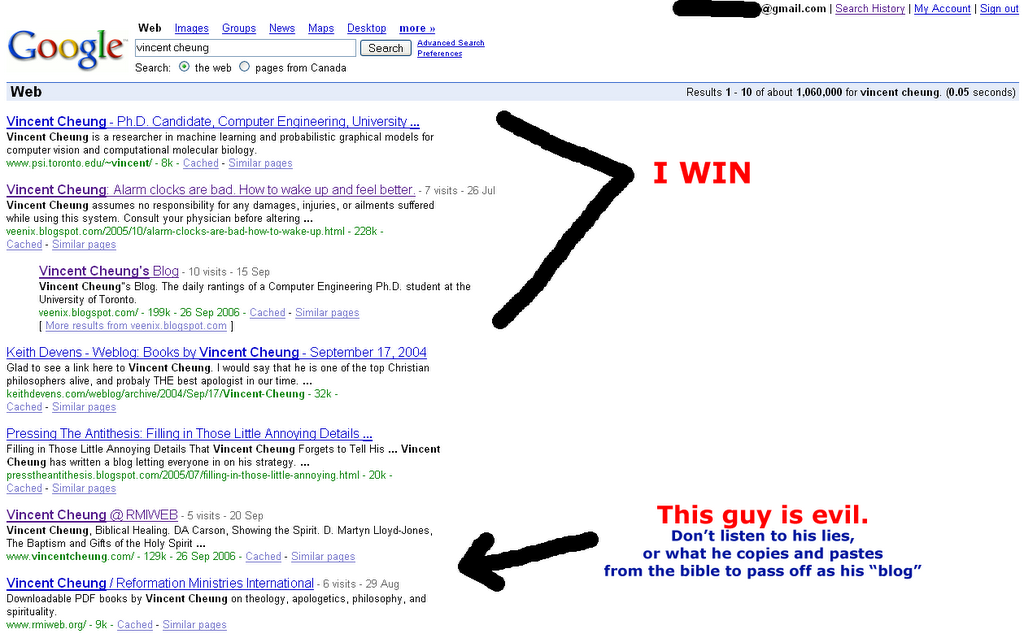
I love Googling myself, and recently I beat out the minister for the top spot!


These are some interest stats. I love Googling myself and also Mike Perrow. I also love Wikipedia and Google Maps.

Ok, some caveats. I use Firefox. The default search engine is Google. If you just type in say, "stuff on cats" in the address bar and click enter, what happens, is that it searches "stuff on cats" in Google and then automagically clicks on the first link for you (it's like the "I'm Feeling Lucky" button). That is logged as a search query in the Google search history. Many of these spurious searches are because of that, for example, I never Google "facebook", I just type in facebook.com in the address bar, but that's not a valid address, which I think causes a Google search query. However, I just tried it and it didn't happen. Firefox may have changed something, b/c when I look at the last like 30 days, Facebook doesn't appear even though I have used Facebook more in the last 30 days than I ever have (thanks to the news feeds :)). I do (or did) however, go to the sites listed quite a bit. No porn showed up, yippee!!! (No, I did not doctor the results :p)

As with all stats, there is probably some truth hidden somewhere in there, but take it with a grain of salt.


On another note: it's 2 am, and I'm not sleeping yet :s. I did however, wake up at 7:30 today! (But snoozed until 8). I was home at 10 am back with $120 of groceries from Loblaws!!! Most productive I've been in the morning for a long time :) (probably since getting smoothies at Google for breakfast)
Home Older Posts »